

What Is Google Ads Conversion Tracking?
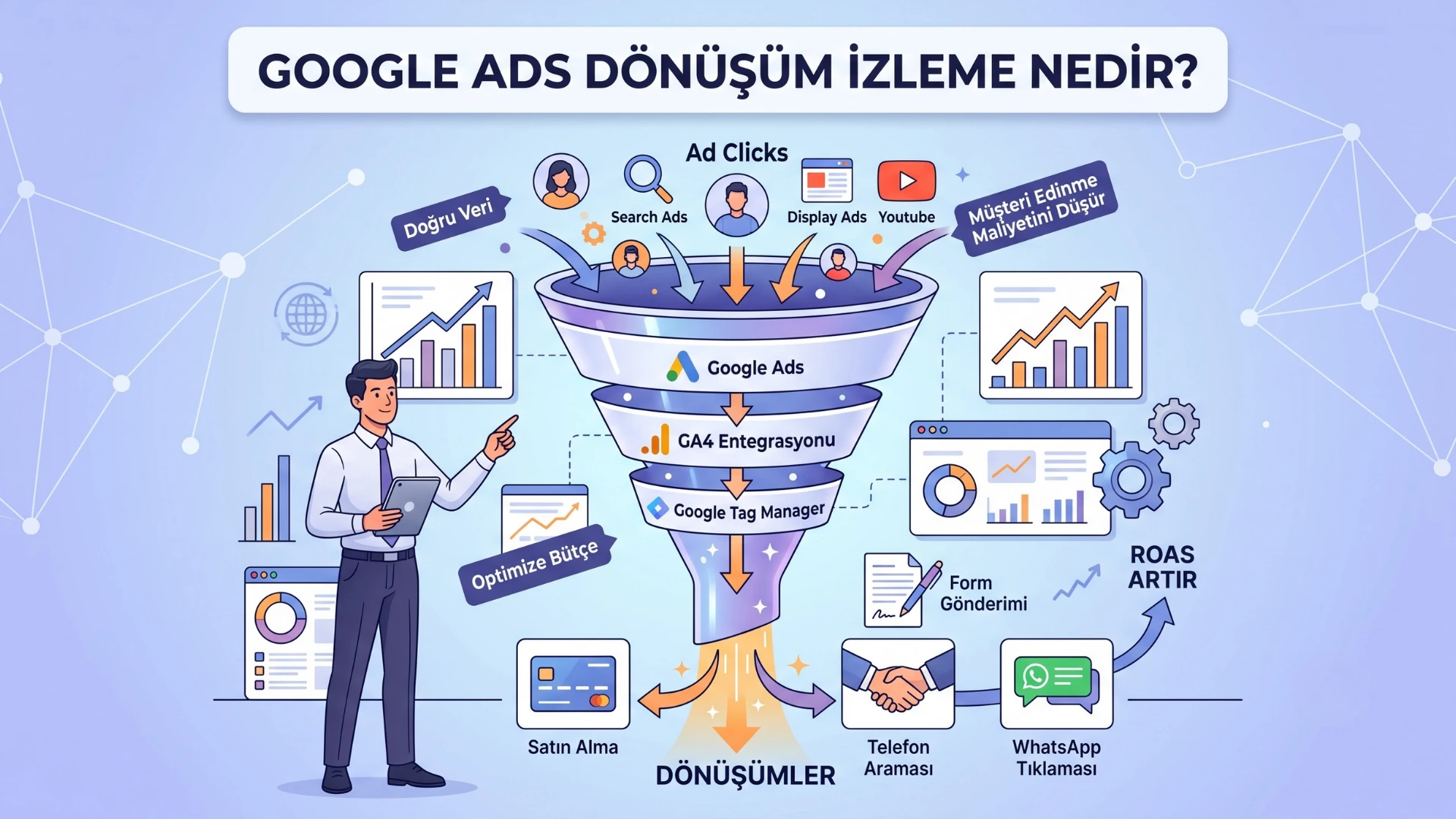
What Is Google Ads Conversion Tracking? Improve Your Ad Performance with Accurate Setup
What Is Google Ads Conversion Tracking?
The most reliable way to measure the success of your Google Ads campaigns is through Google Ads Conversion Tracking. It enables you to track valuable user actions after they click on your ads, such as making a purchase, submitting a form, calling your business, or requesting a quote.
Many businesses invest significant advertising budgets without knowing which campaigns actually generate sales. A properly configured conversion tracking setup allows you to optimize your advertising budget based on real data and maximize your return on investment (ROI).
When integrated with Google Analytics 4 (GA4) and Google Tag Manager (GTM), conversion tracking becomes more accurate and provides valuable insights into your campaign performance.
Why Is Google Ads Conversion Tracking Important?
Conversion tracking does much more than measure ad clicks. It helps you understand which visitors complete valuable actions that contribute to your business goals.
With a properly configured conversion tracking system, you can:
- Optimize your advertising budget more effectively.
- Identify the keywords that generate conversions.
- Detect underperforming campaigns.
- Improve the performance of Smart Bidding strategies.
- Make data-driven optimization decisions.
- Reduce your Cost Per Acquisition (CPA).
- Increase your Return on Ad Spend (ROAS).
Google Ads' machine learning algorithms rely heavily on conversion data. Missing or inaccurate conversion tracking can negatively impact campaign optimization and reduce overall advertising performance.
Which Conversions Can Be Tracked in Google Ads?
Every business has different objectives, so the conversions you track should align with your marketing goals.
The most common Google Ads conversions include:
Form Submissions
Contact forms, quote requests, and demo requests are among the most valuable conversions for B2B businesses.
Phone Calls
Calls generated directly from your ads can represent high-quality sales opportunities, especially for local businesses.
WhatsApp Clicks
Businesses using WhatsApp for customer communication can track click events as valuable lead-generation conversions.
Purchases
For eCommerce websites, completed purchases represent the primary conversion goal.
Add to Cart
Although not a final conversion, Add to Cart events indicate strong purchase intent and are considered valuable micro-conversions.
Email Clicks
Tracking email link clicks helps measure users who intend to contact your sales team directly.
File Downloads
Downloads of brochures, catalogs, pricing documents, or technical resources can indicate strong customer interest.
Appointment Bookings
Appointment scheduling is one of the most valuable conversion actions for healthcare providers, consultants, agencies, and service-based businesses.
How to Set Up Google Ads Conversion Tracking
A professional conversion tracking setup involves much more than simply installing a Google Ads tag. The most reliable implementation combines several Google technologies.
Google Tag Manager Setup
Google Tag Manager enables marketers to manage all tracking tags from a centralized interface without modifying website code for every update.
Its main advantages include:
- Less dependency on developers
- Easier tag management
- Reduced implementation errors
- Faster testing and deployment
- Simplified addition of new conversion events
Google Analytics 4 Integration
GA4 events can be imported directly into Google Ads as conversions.
This allows you to track events such as:
- Purchases
- Form submissions
- Scroll depth
- Video engagement
- Phone clicks
- File downloads
These user interactions provide valuable conversion data for campaign optimization.
Google Ads Conversion Tag Setup
Google Ads generates a unique Conversion ID and Conversion Label for every conversion action.
Using Google Tag Manager, these values are configured and connected with the appropriate triggers to accurately record conversion events.
This setup provides reliable conversion data that Google Ads can use for automated bidding and campaign optimization.
Common Google Ads Conversion Tracking Mistakes
Many businesses believe their conversion tracking is working correctly when important configuration errors actually exist.
Some of the most common mistakes include:
- Duplicate conversion tracking
- Incorrect thank-you page configuration
- Misconfigured triggers
- Missing or incomplete Data Layer implementation
- Missing Consent Mode configuration
- Confusing GA4 conversions with Google Ads conversions
- Losing conversions during cross-domain navigation
- Failing to test tags using GTM Preview Mode
These issues can cause Google Ads to optimize campaigns based on inaccurate data, resulting in wasted advertising spend.
Why Should You Use Google Tag Manager for Google Ads Conversion Tracking?
Most professional digital marketing teams rely on Google Tag Manager to manage conversion tracking efficiently.
Key benefits include:
- Centralized tag management
- Faster implementation
- Safer deployment process
- Advanced debugging capabilities
- Data Layer support
- Server-side tagging compatibility
- Seamless integration with Google Analytics 4
As businesses grow, GTM becomes a far more scalable and maintainable solution than manually inserting tracking codes.
Why Should You Invest in Professional Google Ads Conversion Tracking Services?
Incomplete or inaccurate conversion data affects more than reporting—it directly impacts Google's automated bidding algorithms.
With professional implementation, you can:
- Track all important conversions accurately.
- Optimize campaigns using reliable data.
- Reduce wasted advertising spend.
- Increase ROAS and conversion rates.
- Ensure seamless integration between GA4, GTM, and Google Ads.
- Enable your marketing team to make informed, data-driven decisions.
For businesses managing substantial advertising budgets, a properly configured conversion tracking infrastructure is a critical component of long-term digital marketing success.
Conclusion
Google Ads Conversion Tracking is essential for measuring advertising performance, optimizing campaign budgets, reaching the right audience, and increasing revenue.
By implementing a professional conversion tracking setup using Google Tag Manager and Google Analytics 4, you gain complete visibility into your campaign performance and make smarter optimization decisions based on real user data.
If you're unsure whether your current conversion tracking setup is working correctly—or you're building one from scratch—working with experienced specialists can help you establish a reliable measurement framework that supports sustainable business growth.
Frequently Asked Questions
Is Google Ads Conversion Tracking free?
Yes. Google Ads, Google Tag Manager, and Google Analytics 4 are all free to use. However, implementing them correctly often requires technical expertise.
Is Google Tag Manager required for Google Ads Conversion Tracking?
No. Conversion tags can be installed directly into your website's code. However, Google Tag Manager is widely recommended because it simplifies management, testing, and future scalability.
Are GA4 conversions the same as Google Ads conversions?
No. Google Analytics 4 focuses on analyzing user behavior, while Google Ads conversions are primarily used for campaign optimization and automated bidding. In most implementations, both systems work together.
How long does it take to set up Google Ads Conversion Tracking?
The implementation time depends on your website structure and the number of conversion actions you want to track. A standard setup can often be completed within a few hours, while advanced eCommerce websites or custom Data Layer implementations may require additional time.
 Let's Grow Together in the Digital World

